iOS 27 changes who pays for shared-album storage and introduces optional albums that expire after 30 days. Here is what to check before your next group album.
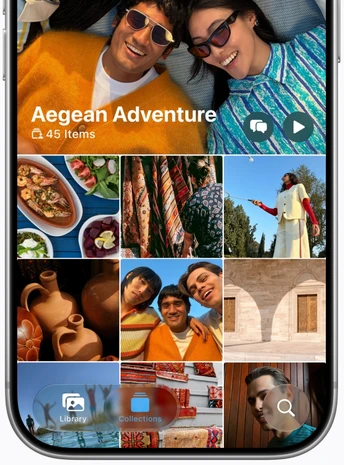 The updated Shared Albums interface in iOS 27. Source: Apple Newsroom.
A shared album starts as a convenient place to collect a weekend away. A few years later, it may be the only place you can find a friend's pictures from that trip. That makes the rules around keeping those pictures important.
Apple's September 14 software release adds full-resolution sharing and browser contributions from Android and Windows devices. See Apple's announcement.
The less obvious changes concern who supplies the storage, what happens when an album expires, and what an upgrade means for older photos. For a private collection you want to keep after the sharing ends, Ente lets you close a sharing link without deleting the photos behind it. How Ente links work.
Who pays for iOS 27 Shared Albums
For regular shared albums created with the new experience, photos and videos use the album owner's iCloud storage. That includes pictures contributed by other people. Apple keeps them in their original formats at full resolution; available storage becomes the limit on how much an album can hold. Temporary albums are an exception. Apple's storage rules.
For an event organizer, the practical question is how much everyone will upload. As an illustration, 2,000 new guest photos averaging 5 MB each would total about 10 GB before any video. That is a planning example, not a measured album size.
Choose the album owner deliberately. The person who creates the album is also taking responsibility for the space the group will need.
Temporary albums expire after 30 days
Apple offers an optional temporary Shared Album. It does not use your iCloud storage, can contain up to 5,000 photos and videos, and expires after 30 days. Any media that has not been saved to a personal library is then deleted.
The deadline matters for everyone who wants a lasting copy. Joining an album and saving its contents are different actions.
Before the deadline, the owner can turn off Make Album Temporary to keep the album, at which point it uses their iCloud storage. Copies already saved to a personal library remain there. These rules apply to temporary albums; regular albums do not automatically expire after 30 days. Apple's temporary-album guide.
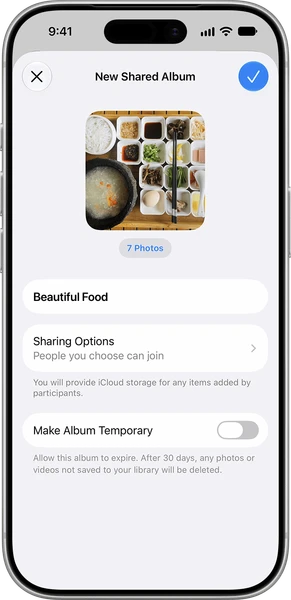 Apple's album-creation screen shows the storage owner and the optional temporary-album setting. Source: Apple Support.
What happens to your older shared albums
Installing iOS 27 does not automatically convert albums created with earlier software. Apple provides a separate album upgrade. After that upgrade, newly shared photos and videos use their original resolution. Existing items stay exempt from your iCloud quota; new additions use the owner's storage. Participants with older software can use iCloud.com to view the upgraded album. Apple's upgrade guide.
Original resolution applies to newly shared files. Keep the originals, and re-share from those files if you want the best-quality versions in an upgraded album. Do not assume an album upgrade can recover detail missing from an older shared copy.
Shared Albums still have a privacy gap
Apple's published iCloud security guide excludes Shared Albums from end-to-end encryption, including when Advanced Data Protection is enabled. The separate iCloud Shared Photo Library has different rules: Apple says it can remain end-to-end encrypted when every participant has Advanced Data Protection enabled. The two features should not be confused. Apple's security documentation.
Ente keeps shared photos end-to-end encrypted, so Ente's servers cannot read them. The people with access to your album can see the pictures, while the company storing them cannot. How Ente sharing works.
Let the link expire while you keep the photos
There are two different things you might want to end after an event: access to an album, and storage of the album itself. Ente lets you set an expiry for a public link or remove that link later. Removing it leaves the album's photos in your account. Ente's link controls.
For a birthday, reunion or group trip, collect the pictures, give everyone time to enjoy them, then close the link. Your collection can stay private in Ente. You still need storage for it; closing a link is a sharing decision, not a way to avoid storage costs.
A plan for photos you want to keep
Before the next trip, agree on who will keep the group's photos and how long the invitation to contribute should stay open. Then build the album around that decision.
1. Choose one home for the collection. Create an Ente album for the event. Give it a name that will make sense next year, and tell the group where the final collection will live.
2. Let guests contribute from their browsers. Enable Allow adding photos on the album's sharing link. Guests can upload without installing Ente or creating an account. We introduced account-free photo collection in 2022. Read about Collect.
3. Decide when to close the link. Set an expiry date that gives people time to upload and save what they want. You can also add a password. Treat the link as private: it carries the key needed to view the photos. Manage access.
4. Budget for the whole group. Uploads through an Ente Collect link count toward your storage. Free-plan public links have a 10-device limit; paid plans can create links without a device limit. Check those settings before distributing an event link. Plan and storage details.
For photos you want to keep after the event, Ente combines encrypted sharing with control over when access ends. Create your next album with Ente.
For the broader feature breakdown, see our Ente vs. Apple Photos comparison.